Race Analyst: Your Race, Read From the Tracks
Every race you sail with Committee Boat HQ records each boat's GPS track, every rounding and every finish. The Race Analyst turns that into the story of the race: where it was won and lost, how each boat sailed each leg, and one thing every crew can work on. It runs in the AI assistant you already use.
Download the Race Analyst skill
What you get
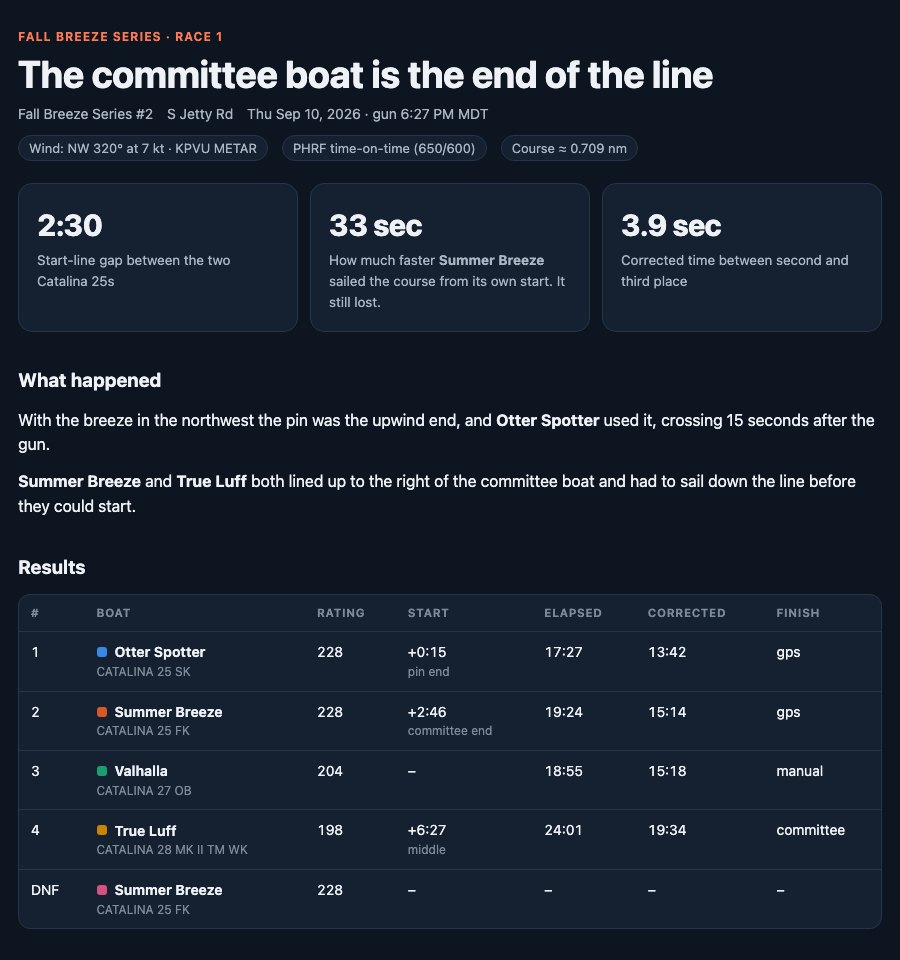
- The story of the race. The one or two moments that decided it, in plain English, with the numbers behind them.
- Starts, measured. How far behind the line each boat was at the gun, when it crossed, and at which end.
- Leg-by-leg splits timed from each boat's own start, with the distance actually sailed against the straight line, so overstood laylines and wide roundings show up in metres and seconds.
- How close it was. The corrected-time gap to the next place, and exactly how much quicker a boat needed to be to take it.
- A report card for every boat, graded against the fleet on the day, with something done well and something to work on.
- An interactive course map with every track and a time scrubber, in a single page you can share.
How it works
1. Add the skill (once)
Download the skill above. It's a small ZIP; don't unzip it.
- Claude: in Claude on the web or desktop, open Settings → Capabilities, make sure code execution is on, then under Skills choose Upload skill and pick the ZIP. Skills need a paid Claude plan.
- ChatGPT: the skill uses the open Agent Skills format that ChatGPT also supports. Open Skills in ChatGPT and upload or import the same ZIP.
Setting it up is easiest on a computer. Once it's added, it works in the phone apps too.
2. Export your race
In the Committee Boat HQ app, open the finished race and tap Export race data. You get a ZIP of four CSV files: the race, the course marks, the entries with their results, and every GPS fix. Anyone who sailed the race or ran its committee can export it.
3. Ask for the analysis
From the share sheet, send the ZIP to the Claude or ChatGPT app (or attach it to a new chat) and ask something like "Analyse my race." The skill runs the numbers, asks you about the wind if it can't find a report for your venue, and comes back with the recap and the report.
Tell it the wind. The tracks can't record the breeze. If you know the direction and strength, say so in your first message and the analysis of the starts and laylines gets much sharper.
What it can and can't tell you
Phones report a position about every fifteen seconds, so start and rounding times are good to a few seconds and distances to a few metres. That is plenty to see a two-minute start problem or a 50-metre overstand, and not enough to settle a two-second argument. The analysis says so when it matters. A leg where a phone lost signal is marked as missing rather than guessed at, and the skill describes what the tracks show rather than inventing reasons for them.
For a worked example, read Won at the Gun, the recap of a real two-race night that this method was built from.
Your data
The export contains boat names, sail numbers, ratings, results and GPS positions. It contains no names, email addresses or account details. It only goes where you send it: when you upload it to an AI assistant, that service's own privacy terms apply.
For the curious
The skill is a folder of plain files you can open: instructions for the assistant, a standard-library Python script that does the measuring, the grading rubric, and the report template. The same export works in a spreadsheet or your own code; the ZIP's README documents every column.
Race with Committee Boat HQ
Synced start sequences on every phone, GPS finishes, live PHRF and Portsmouth scoring, full race replays, and now your own race analyst.